Threat modeling
at the speed of code.
Your threat model lives in the code, so it can’t go stale.
GuardLink keeps your threat model inside your code.
Every security engineer and every developer knows how it goes. The threat model gets written once and forgotten the day coding starts. After that, it’s pentests and scanners. So we asked a simple question. What if every developer left a comment for the security team, right in the code? Add a file upload, and write beside it: @exposes “File upload here. Not security reviewed yet.” The security team reads those comments and knows exactly what to test. The fix gets a comment of its own, and the loop keeps going. Now AI coding agents write the code and the comments, and GuardLink runs the loop. Your codebase becomes the single source of truth, so no threat quietly gets lost.
Live from GitHub and npm, refreshed every hour. Each figure links to its source.
Security knowledge lives outside the code.
That is the bug.
Teams pay for all three, and all three start going stale the next time someone opens an editor.
Two lines in a pull request. The reviewer reads them next to the code they describe, the parser checks that #cmd-injection and #tui are declared, and the exposure stays open until a control answers it.
Three commands keep the model current.
GuardLink puts the claims in the repository and checks them, so a stale claim fails the build instead of sitting there unnoticed.
- 01 / 03
An agent writes the claims
Your coding agent reads the code and records what each part holds, what threatens it, and what already defends it. Claims go in .gal sidecar files by default, or inline in comments.
$ guardlink annotate - 02 / 03
The CLI checks them
Every #id must resolve to something declared. Dangling references, duplicate ids and syntax errors fail here, not six months later when someone finally reads the model.
$ guardlink validate . - 03 / 03
CI enforces them
An exposure with nothing answering it fails the build. To close one, name the control that handles it, or have a person accept the risk under their own name.
$ guardlink ci --strict
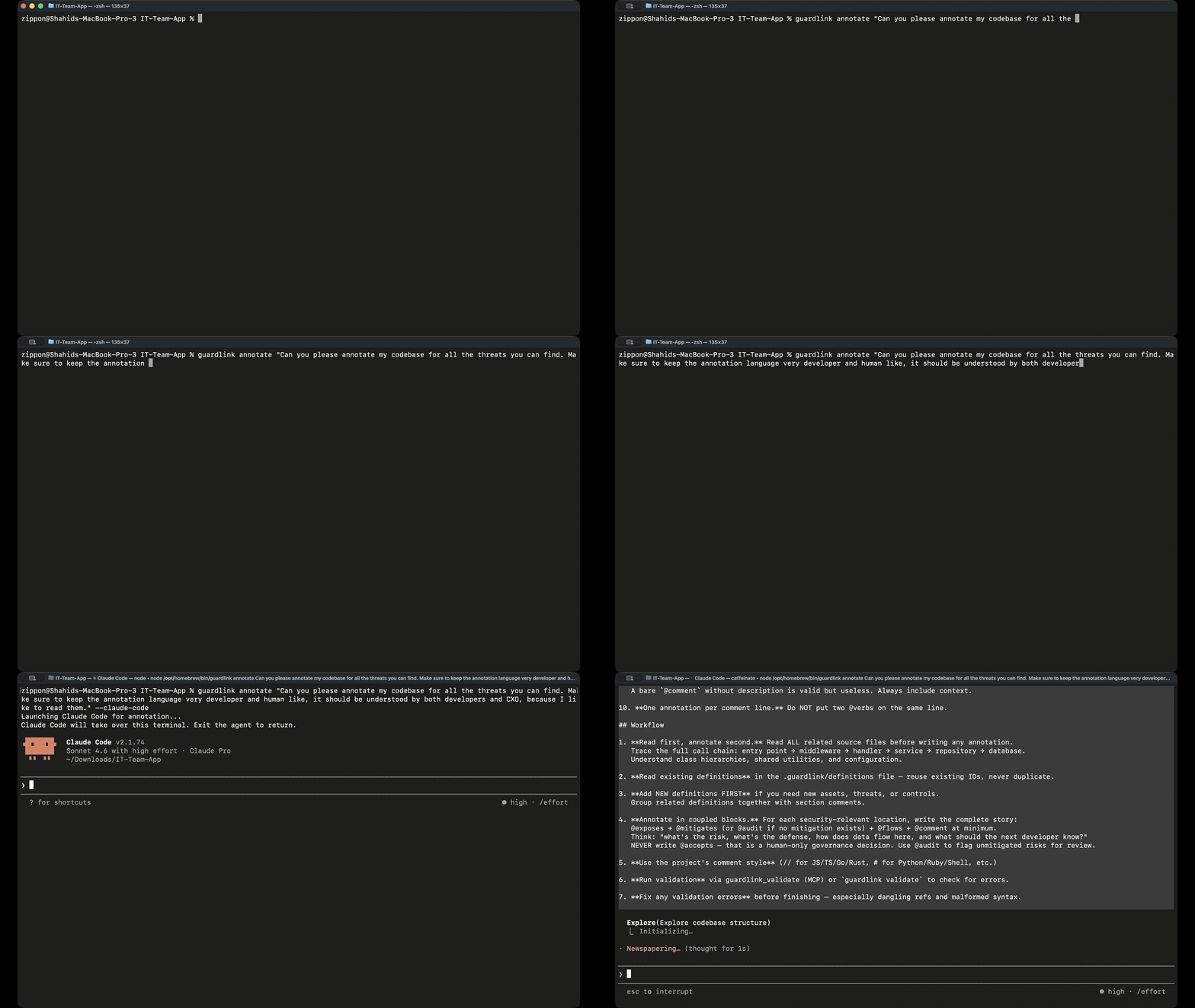
Recorded: an agent annotating a real codebase. It reads the source, then writes the asset, threat and mitigation claims that the next two commands check.
Twenty verbs. Two of them close a finding.
GAL is a small grammar for security intent. It lives in comments, so it works in any language, and its one job is to make a claim about code checkable.
Relationships
Connect threats to assets. Record the controls and decisions that resolve them.
@exposesopens finding- Marks an asset exposed to a threat at this line. Every one creates a finding.
@mitigatescloses finding- Names the control that answers a threat on an asset, and closes the finding.
@confirmed- Records a threat as verified exploitable, with the evidence that proved it.
@acceptscloses finding- Records a decision to carry the risk instead, which also closes the finding.
@entitles- States an actor is entitled to a capability by design. An agent proposes; a person accepts.
@transfers- Moves responsibility for a threat to another asset or team.
What comes out the other end.
One command turns the model into a self-contained HTML dashboard. The screens below are real output, and the dashboard itself is hosted on this site.
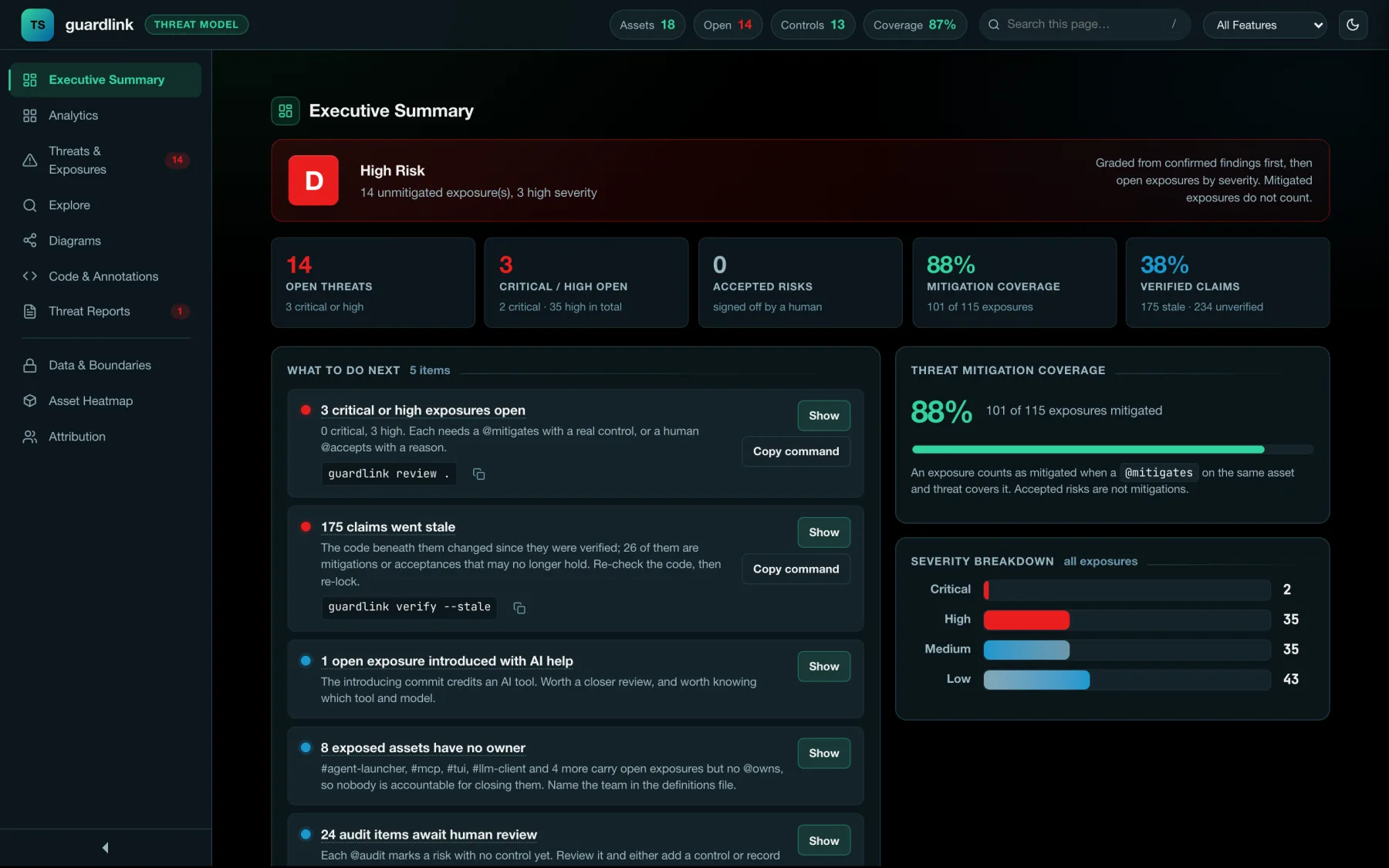
Executive summary. A risk grade, the counts behind it, and what to do next — each item carrying the command that does it. This is the page a security lead opens.
Open this viewOpen the real dashboard
The file guardlink dashboard wrote, served unchanged: one HTML file, no server, no build step. Open the drawers and diagrams yourself.
Watch the full run
From an empty repository to a reviewed threat model: init, annotate, validate, and the dashboard the run produces.
Your coding agent writes the annotations.
guardlink init detects your coding agent and sets up two things: an MCP server it can query, and a rule in its instruction file that tells it to annotate security-relevant code as it writes it.
- MCP + ruleClaude Code
CLAUDE.md + .mcp.json - MCP + ruleCursor
.cursorrules + .cursor/mcp.json - MCP + ruleWindsurf
.windsurfrules + .windsurf/mcp.json - MCP + ruleCline
.clinerules + .cline/mcp.json - rule onlyCodex
AGENTS.md - rule onlyGitHub Copilot
.github/copilot-instructions.md
28 tools the agent can call
Read the model, validate it, suggest annotations for a snippet, query threats by keyword, generate a report or a dashboard, export SARIF, or diff against a git ref. The agent asks “what threatens #api?” before it writes code that touches the API.
An agent can find an exposure and propose an entitlement. It cannot accept a risk, or decide that a caller was always meant to hold a power: those two statements close a finding or excuse one. The MCP server’s annotate tools reject @accepts and @entitles. An entitlement goes to a person as a proposal, and an acceptance is written only with the name of the person who made the call.
A threat model that can fail a build.
GuardLink runs as a check. A new route with no annotations, or a control removed from under an exposure, shows up in the diff and can block the merge.
- name: Install GuardLink
  run: npm install -g guardlink

- name: Validate annotations
  run: guardlink validate .

- name: Threat model diff
  run: guardlink diff --from origin/main --to HEAD

- name: Export SARIF
  run: guardlink sarif . -o guardlink.sarif

- uses: github/codeql-action/upload-sarif@v3
  with: { sarif_file: guardlink.sarif }
The full workflow, with PR comments and SARIF upload, ships as examples/github-action.yml. Multi-repo setups get two more in examples/ci/.
Unmitigated exposures: 14 (high 3, medium 6, low 5)Anchor drift: 0 (no anchored @source blocks to check)⚠ 14 unmitigated exposure(s):#mcp → #cmd-injection [high] (src/mcp/index.ts:6)#tui → #cmd-injection [high] (src/tui/commands.ts:11)#agent-launcher → #prompt-injection [high] (src/agents/prompts.ts:6)#mcp → #prompt-injection [medium] (src/mcp/server.ts:37)#suggest → #dos [low] (src/mcp/suggest.ts:16)…
Run on GuardLink’s own repository; nine more lines are cut here. It is advisory by default and exits 0; --strict makes it a gate.
- New route, no annotations
- The diff shows the gap before a reviewer has to spot it.
- Control removed
- The exposure reopens, and --fail-on-new blocks the PR.
- Exposure accepted
- Recorded under a person's name, not deleted.
Model your first threat
in about ten minutes.
Node 18 or newer is the only requirement. init detects your agent and writes the config; everything after that is three commands.
A threat model says what's exposed. Testing says what's reachable.
GuardLink stops at the code: it never builds or runs your app. When you need to know which exposures an attacker can actually reach, that is what Bravos, Bugb's pentesting product, is for.
GuardLink, open source
What's exposed
Reads the annotations in your source and lists every exposure: the asset, the threat, and whether anything mitigates it.
Bravos, from Bugb
What's reachable
Attacks a running copy of your app with real logins, and ends every threat with a verdict and the reason for it:
- confirmed
- refuted
- not tested
Not sure what GuardLink would find in your code? Send a public GitHub repository and the Bugb team runs GuardLink on it, then emails you the threat model it finds. Nothing is pushed to your repository.
GuardLink is open source. A star helps it travel.
It costs nothing and takes one click, and it does two things for a project this size.
- Other teams find it
- GitHub search, topic pages and trending lists all weigh stars. Each one makes GuardLink easier for the next team looking for a threat model they can keep in their code.
- The maintainers know it is used
- Stars tell us people rely on it. Issues tell us what to build next, so if something is missing, an issue is worth even more than a star.
Other ways to help
19stars on GitHub today
Help us reach 25 stars.
19 of 25. The goal is the next round number, and moves when we pass it.
Star on GitHubOpens the repository. The Star button is at the top right.