Introduction
GuardLink is an open specification and CLI for continuous threat modeling. Security decisions are embedded directly in source code as structured comments using GAL (GuardLink Annotation Language) — so your threat model updates automatically when code changes. AI coding agents maintain annotations as they write code, CI pipelines enforce security posture on every PR, and an interactive dashboard gives stakeholders real-time visibility.
WHY GUARDLINK?
- Security knowledge lives next to the code it describes — never stale.
- AI agents (Claude, Cursor, Windsurf, Cline, Codex) maintain the model via MCP.
- CI/CD gates block PRs that introduce unmitigated exposures.
- Language-agnostic (25+ comment styles), zero runtime cost, open specification.
- 16 annotation verbs covering assets, threats, controls, data flows, and governance.
- AI threat reports with STRIDE, DREAD, PASTA, and more — powered by any LLM provider.
Installation
Install GuardLink globally via npm to use the CLI from any directory. Requires Node.js 18+.
Clone the repo, then npm install && npm run build. Use node dist/cli/index.js or link via npm link.
Add GuardLink to your MCP client config (e.g. Cursor) so AI agents can call guardlink_parse, guardlink_validate, and guardlink_dashboard.
Quick Start
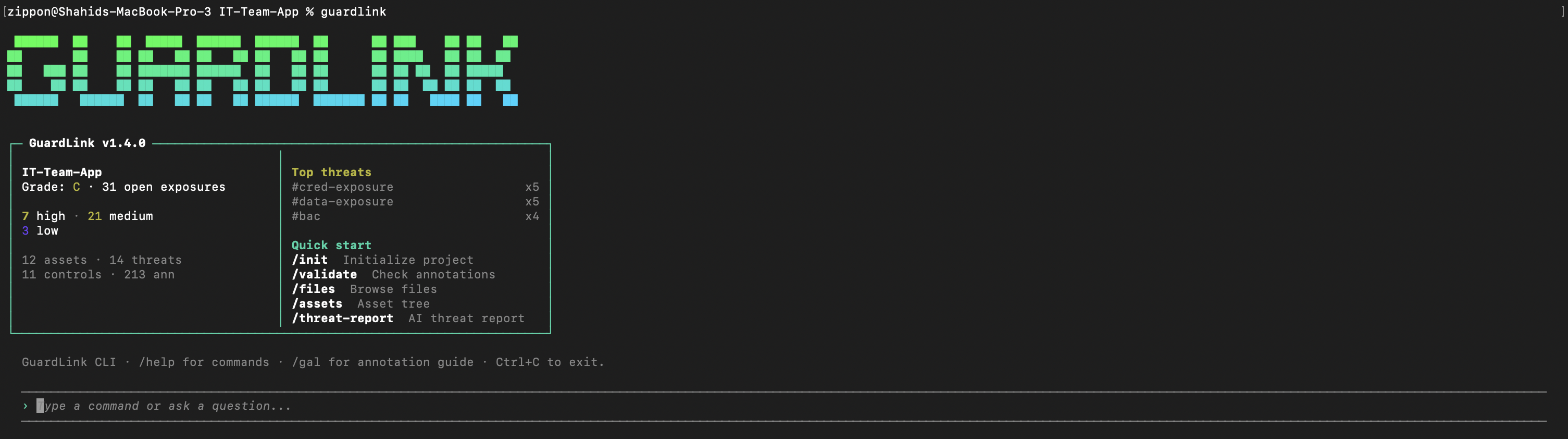
A clean terminal-first workflow for initialization, parsing, validation, reporting, and review.
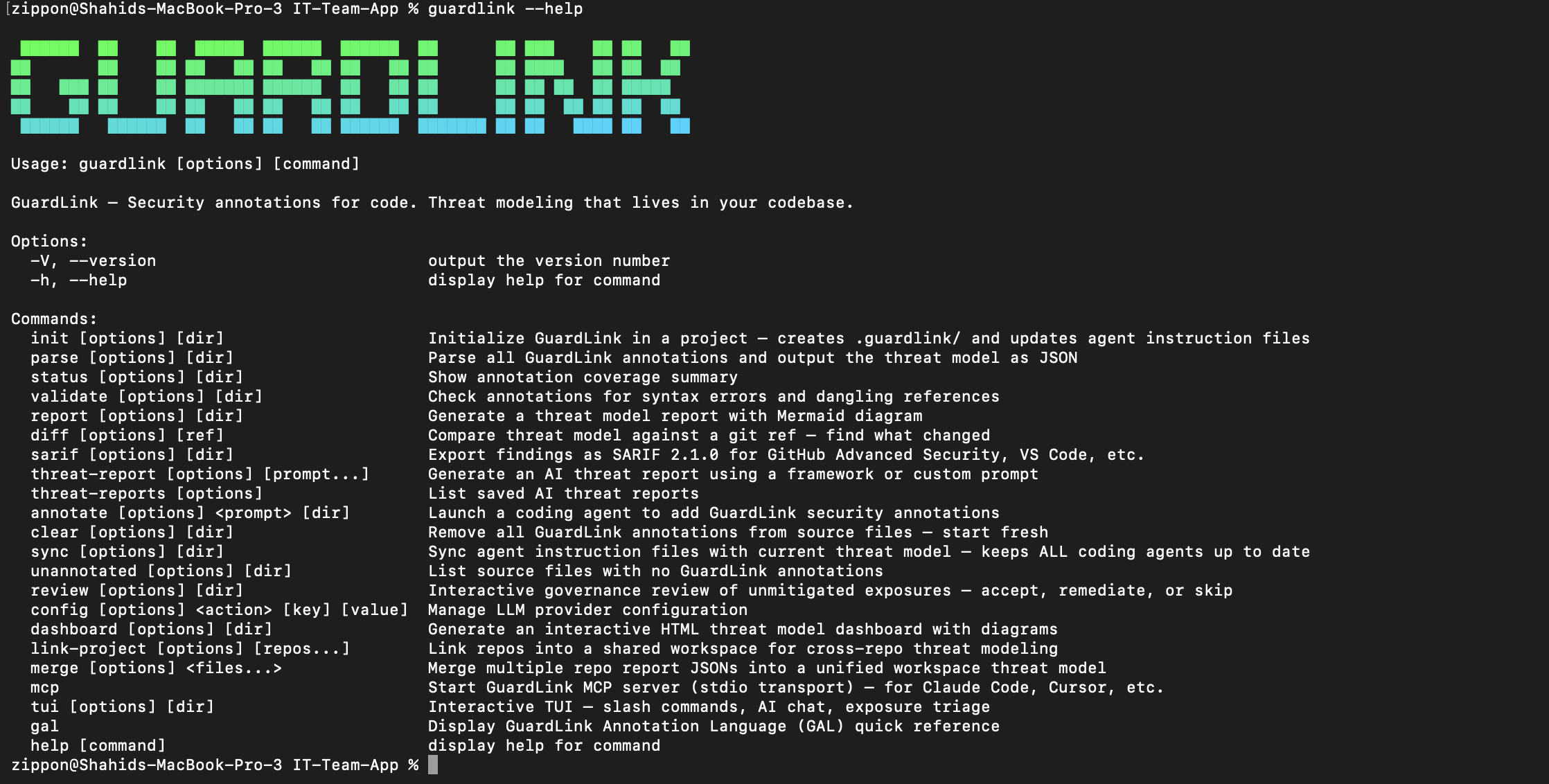
Discover commands quickly from the CLI before wiring GuardLink into agents or CI.
How to Use Guide
1Initialize & Agent Setup
Run guardlink init in your project root. GuardLink auto-detects your language and framework, creates the .guardlink/ scaffold with definition templates, and injects behavioral directives into your AI agent's instruction file so annotations are maintained as code is written.
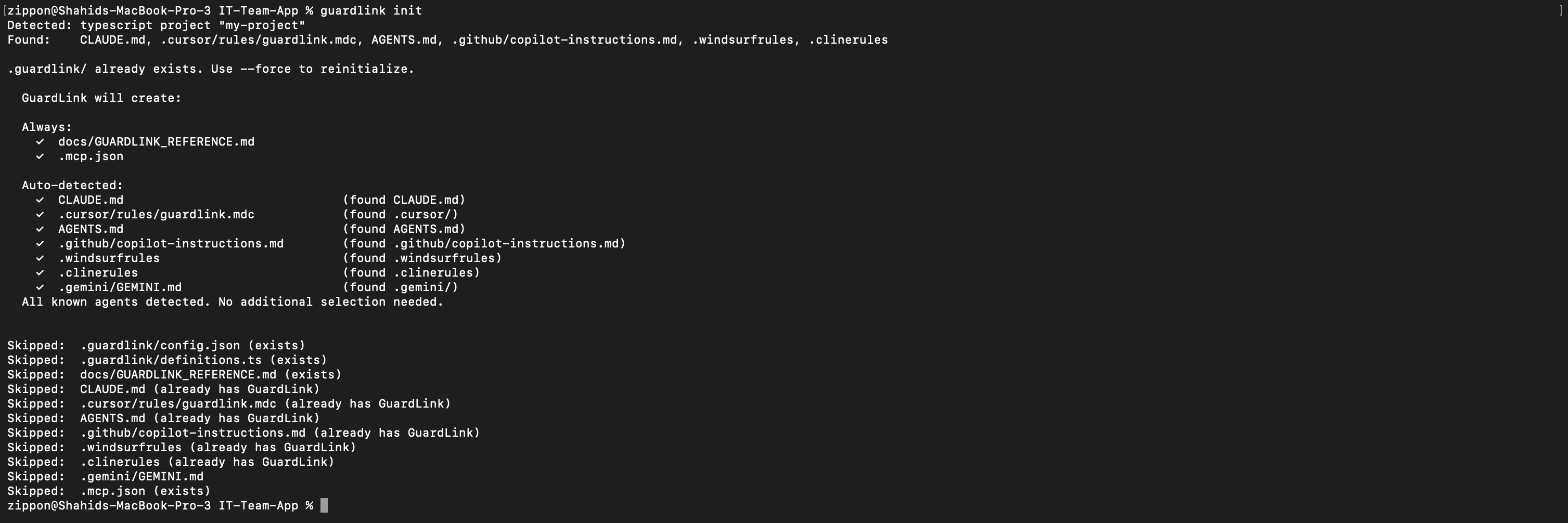
`guardlink init` sets up agent instructions and the local `.guardlink/` project scaffold before annotation begins.
2AI-Powered Annotation
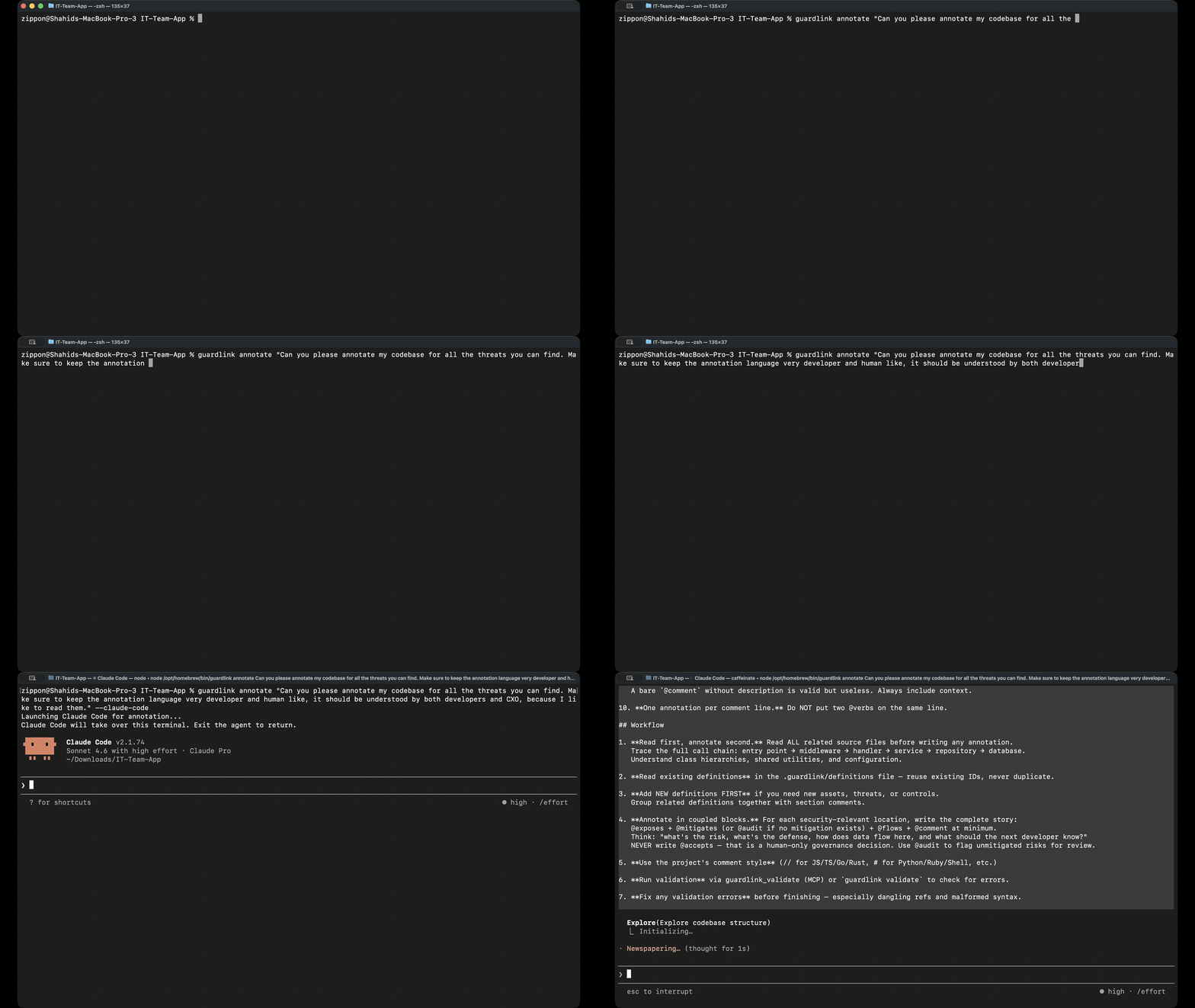
Simply instruct your AI agent to "read guardlink gal" to understand the annotation language. Then, sit back and sip your coffee while the agent autonomously scans and annotates your codebase with security intent.
3The GuardLink Toolchain
Once the AI has finished annotating, run the core toolchain to process your threat model:
guardlink parseExtracts GAL annotations from your source code.
guardlink validateChecks for syntax errors and unmitigated threats.
guardlink reportGenerates a detailed Markdown threat model.
guardlink dashboardLaunches an interactive visualization in your browser.
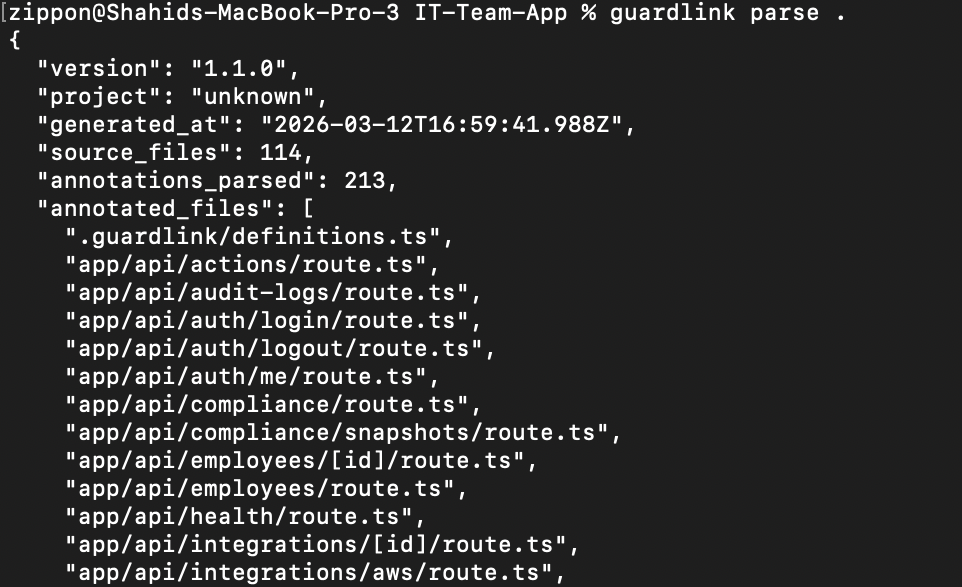
Extract annotations and assemble the threat model graph from source comments.
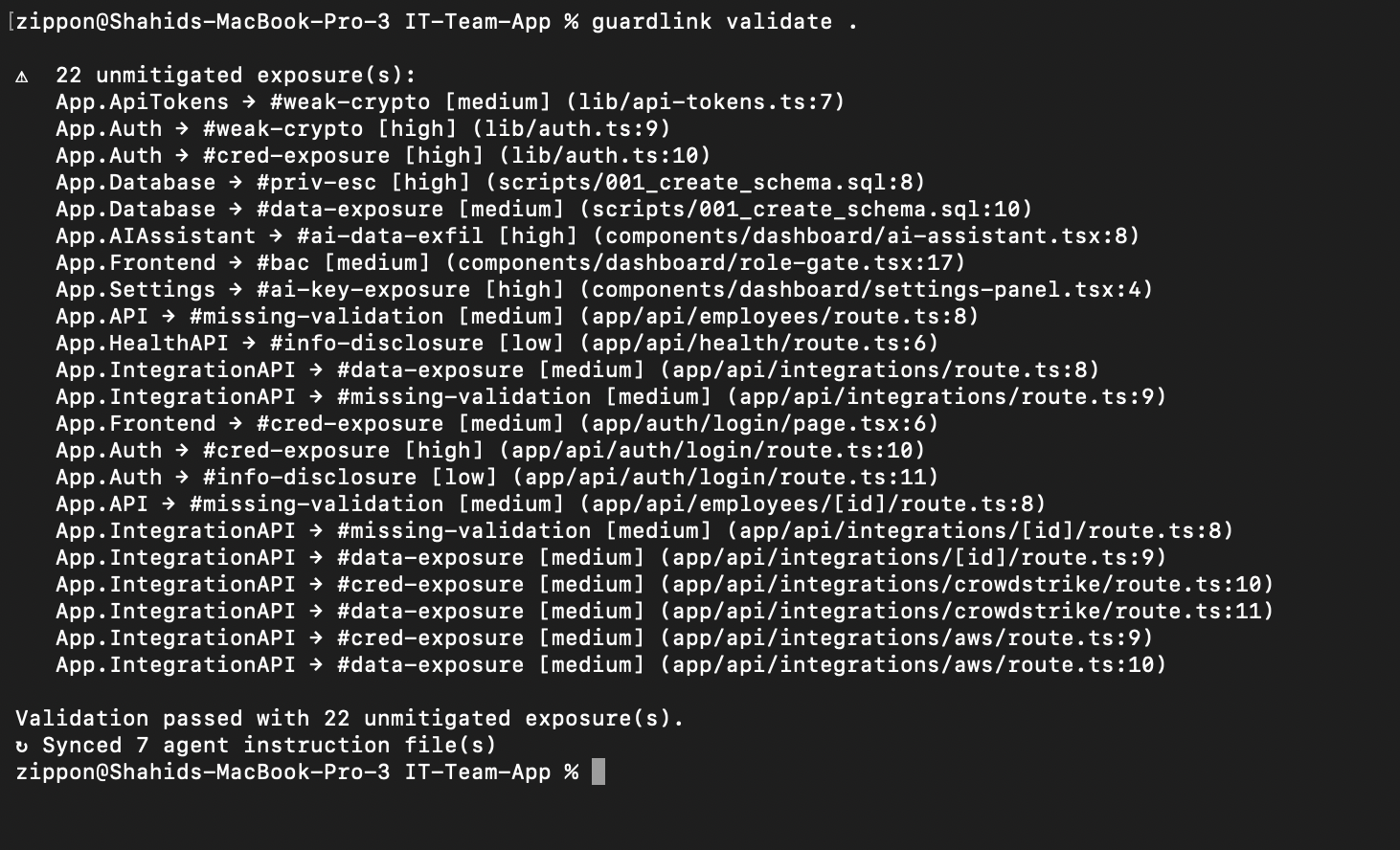
Catch syntax issues, dangling refs, and unmitigated exposures before they ship.

Generate markdown and JSON outputs for reviewers, pipelines, and downstream tooling.

Produce the interactive HTML dashboard for visual triage and stakeholder reviews.
4AI Threat Reports
Generate deep security analysis using established threat modeling frameworks. GuardLink sends your parsed threat model to an LLM and produces a structured report with actionable findings, severity ratings, and remediation guidance.
Anthropic (Claude), OpenAI, Google Gemini, DeepSeek, Ollama, and OpenRouter. Configure with guardlink config.
Delegate to coding agents with --claude-code, --codex, --gemini, or copy to clipboard for IDE agents with --cursor.
Reports can leverage CVE/NVD lookup, codebase search, and finding validation tools during analysis for grounded results.
Reports are saved to .guardlink/threat-reports/ and appear in the dashboard's AI Analysis page for team review.
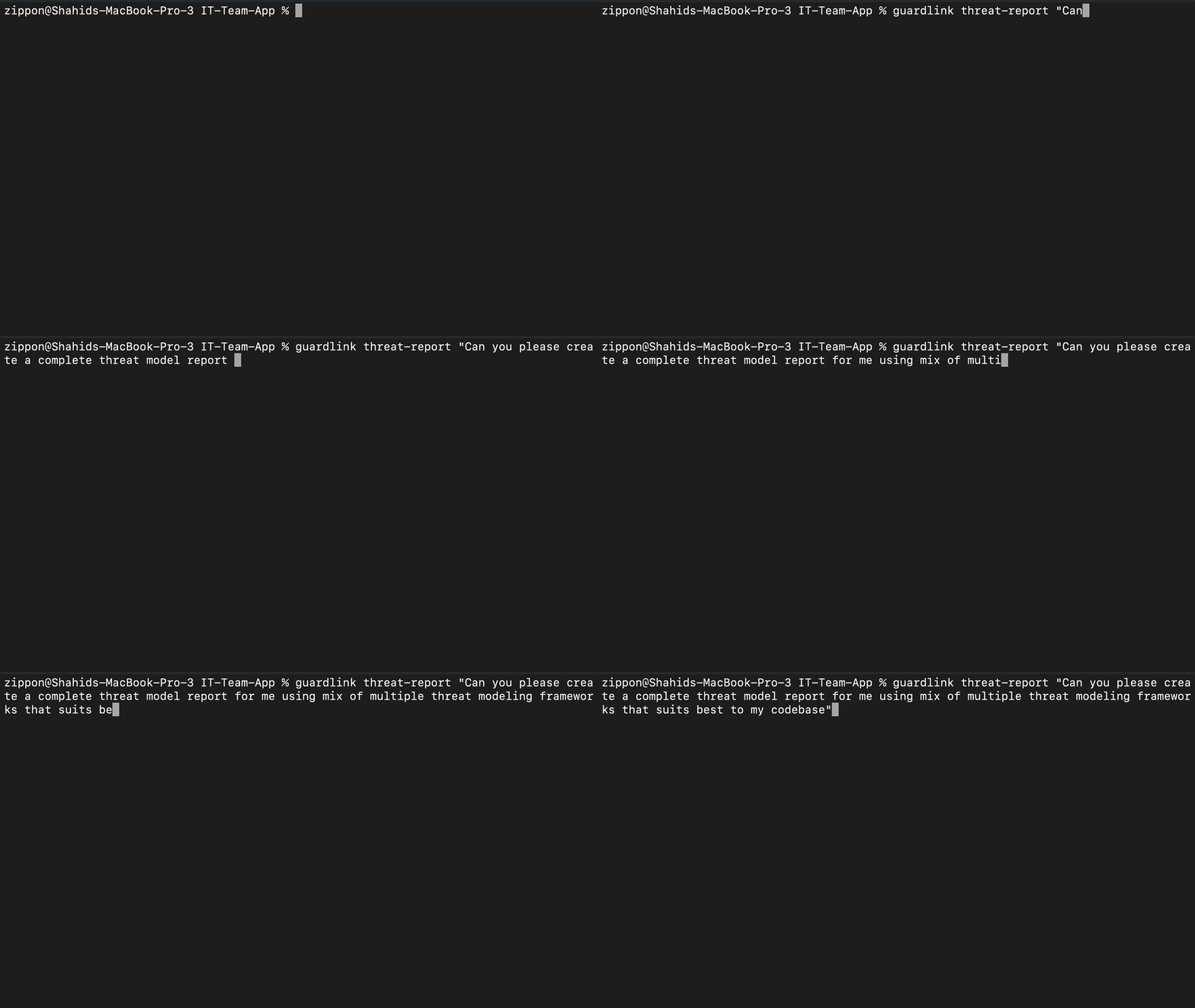
AI-assisted threat report generation using the parsed threat model. The LLM analyzes your assets, exposures, controls, and data flows to produce framework-driven findings.
Open full size5Explore the Dashboard
Launch an interactive HTML dashboard to visualize your entire threat model — executive metrics, Data Flow Diagrams, threat graphs, attack surface maps, and asset heatmaps. Share the single self-contained threat-dashboard.html file with stakeholders.
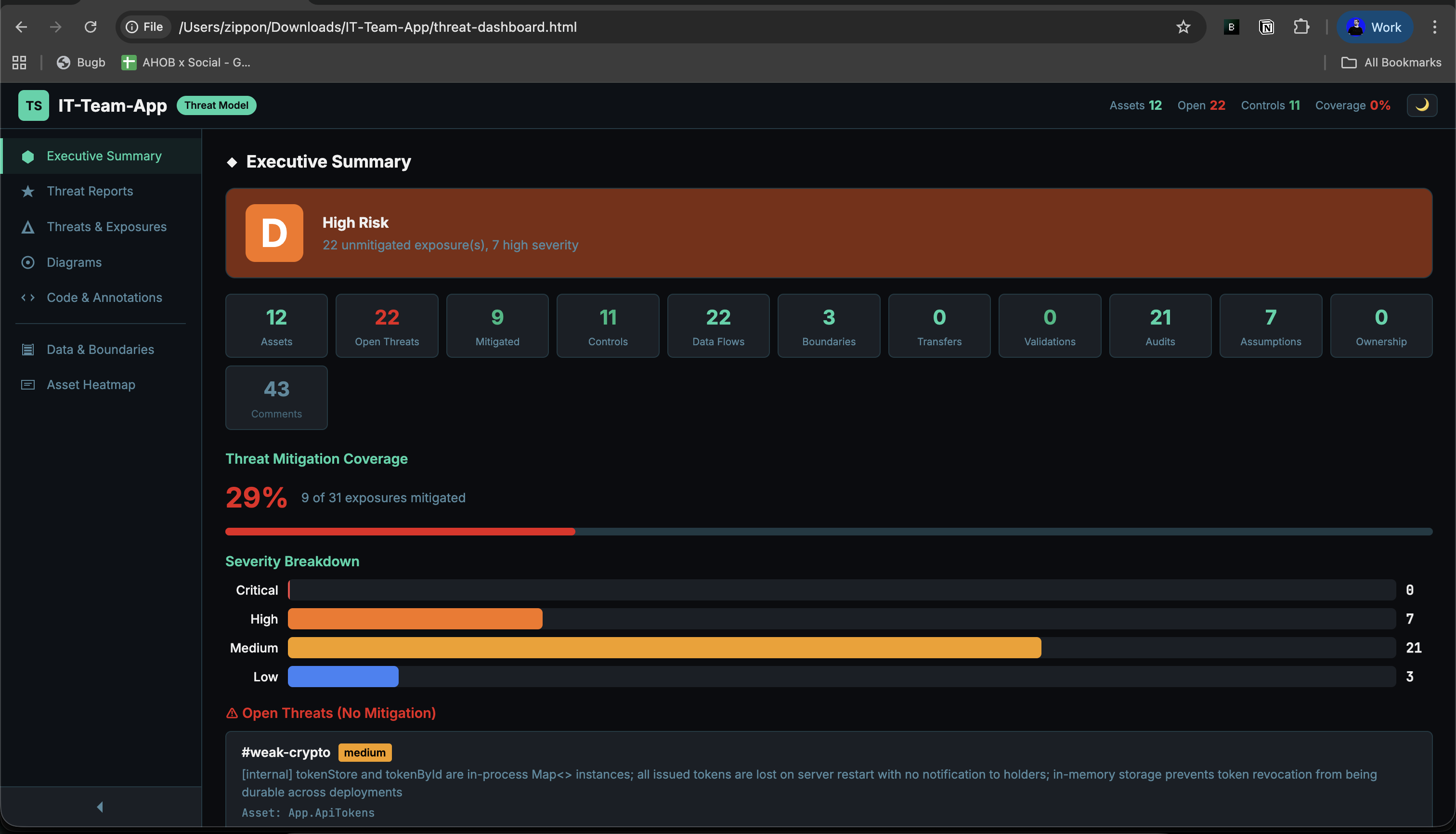
Top-level metrics, risk grade (A–F), coverage percentage, severity breakdown, and exposed-asset overview — all generated from your annotations.
Open full sizeGovernance & Maintenance
A threat model is only useful if it stays maintained. GuardLink provides human-in-the-loop review for risk acceptance, agent instruction synchronization, coverage gap detection, and annotation cleanup — so the model stays accurate as your codebase evolves.
guardlink reviewInteractive governance review for unmitigated exposures. Reviewers can accept, remediate, or skip findings with justification and audit trail support.
guardlink syncResynchronize agent instruction files with the current threat model so AI tooling stays aligned with the latest definitions and workspace context.
guardlink unannotatedList source files with no annotations so coverage gaps are visible before they become stale architecture blind spots.
guardlink clear --dry-runPreview or remove annotations when you need to restart modeling, migrate formats, or clean a test repository.
Also Available In TUI / MCP
The same maintenance workflow is available in the terminal UI through /review, /clear, /sync, and /unannotated, with companion MCP tools for agent integrations.
Important Guardrail
Risk acceptance is intentionally human-owned. Use guardlink review for @accepts decisions, and rely on auto-sync in status or validate to keep agent context up to date.
Architecture
GuardLink is a single-binary Node.js CLI with three entry surfaces — CLI commands, an interactive TUI, and an MCP server — all feeding the same parse-and-report pipeline. Source files are scanned, GAL annotations extracted, references resolved, and the result assembled into a canonical ThreatModel JSON. That model powers every output: markdown reports, HTML dashboards, SARIF exports, git diffs, and AI threat analysis.
Architecture Components
The GuardLink runtime is intentionally small, but it has a few clear layers: entry surfaces, project context, parsing and resolution, governance/workspace logic, and output renderers.
Execution Path
CLI commands, TUI slash commands, and MCP tools all feed the same parse and reporting engine.
GuardLink reads `.guardlink/definitions.ts`, optional `workspace.yaml`, and current agent instructions before resolving refs.
File scanners strip comments, extract GAL, normalize nodes, and resolve local plus cross-repo references.
Assets, threats, controls, exposures, flows, boundaries, metadata, and `external_refs` become one portable JSON model.
The same model powers markdown, JSON, HTML dashboards, SARIF, git diff, and weekly workspace merge summaries.
Core Files And Artifacts
.guardlink/definitions.tsDefinitions for assets, threats, and controls. Runtime relationships reference these IDs instead of repeating the taxonomy in every file..guardlink/workspace.yamlOptional multi-repo identity and sibling registry mapping used for external reference detection and merged reporting.guardlink-report.jsonMachine-readable report output with repo, workspace, commit SHA, schema version, and annotated coverage metadata.threat-dashboard.htmlSelf-contained triage UI with metrics, drawers, Mermaid diagrams, AI reports, and embedded parsed model data.Entry surfaces. CLI and TUI operate on the local repo, while MCP exposes the same capabilities to agents over stdio.
Scans files, strips comments, extracts GAL lines, normalizes verbs, and resolves local plus workspace references into a stable graph.
Holds assets, threats, controls, flows, boundaries, audit notes, metadata, and the `external_refs` needed for multi-repo merges.
`review`, `sync`, `unannotated`, and `clear` keep the model maintained and ensure risk acceptance stays human-controlled.
`link-project`, `merge`, and `--diff-against` unify sibling repos, resolve cross-repo tags, and track week-over-week drift.
Reports, dashboard, SARIF, git diff, and AI threat reports all consume the same model so review surfaces stay consistent.
Codebase Overview
The GuardLink CLI codebase is organized by capability. Definitions for assets, threats, and controls live in .guardlink/definitions.ts; all other modules reference them by #id. Key directories:
The project is annotated with GuardLink itself: .guardlink/definitions.ts declares assets (e.g. #parser, #dashboard, #mcp), threats (#xss, #path-traversal), and controls (#output-encoding, #path-validation). Source files use @exposes, @mitigates, @flows, and @comment to document the threat model. Run guardlink dashboard . in the repo to see the generated threat-model dashboard.
GAL Specification
GAL is a structured grammar designed to be both human-readable and machine-parsable. All annotations follow a standard pattern:
Definition Verbs
Used to declare the building blocks of your threat model.
@asset<path> (#id)Declares a component, service, or resource.
@threat<name> (#id) [severity]Names a threat or vulnerability class.
@control<name> (#id)Names a security defense mechanism.
Relationship Verbs
Connects assets, threats, and controls into a graph.
@mitigates<asset> against <threat> [using <control>]Declares a defense against a threat.
@exposes<asset> to <threat> [severity] [external-refs]Declares a known vulnerability or weakness.
@accepts<threat> on <asset>Acknowledges and accepts a known risk.
@transfers<threat> from <source> to <target>Delegates risk responsibility to another component or external service.
@flows<source> -> <target> [via <mechanism>]Describes data flow between components.
@boundarybetween <asset-a> and <asset-b> [(#id)]Declares a trust boundary between two components. Also supports pipe syntax: asset-a | asset-b.
Lifecycle Verbs
Track validation, ownership, audits, and security assumptions over time.
@validates<control> for <asset>Declares that a test verifies a security control is working.
@audit<asset>Flags a component for security review.
@owns<owner> for <asset>Assigns security ownership of a component to a team, role, or individual.
@handles<classification> on <asset>Classifies the type of sensitive data a component processes. Classifications: pii, phi, financial, secrets, internal, public.
@assumes<asset>Documents a security assumption that the code relies on.
Comment & Special Verbs
Developer notes and AI exclusion markers.
@comment[-- "<description>"]Adds a security-relevant developer note to the threat model.
@shield[-- "<reason>"]Excludes code from AI agent context. Use @shield for a single function, or @shield:begin / @shield:end for a block range.
Parsing & Output
The parser is GuardLink's core engine. guardlink parse recursively scans every source file, detects comment syntax per language, extracts GAL annotations, resolves cross-references (including cross-repo workspace tags), and assembles everything into a structured ThreatModel JSON — the single source of truth that powers all downstream outputs.
v1.4.0 • 2026-02-27
Multi-Repo Workspaces
GuardLink can link multiple service repositories into a unified threat model with cross-repo tag resolution, merged dashboards, and week-over-week risk tracking.
guardlink link-project <repos...> --workspace <name> --registry <url>Scaffolds .guardlink/workspace.yaml in each repo, auto-detects repo names from git or project files, and injects workspace context into agent instruction files.
guardlink link-project --add ./new-service --from ./api-gatewayguardlink link-project --remove auth-lib --from ./api-gatewayAdds or removes repos from an existing workspace and updates sibling repos discovered on disk so the workspace stays consistent.
guardlink report --format json -o guardlink-report.jsonPer-repo JSON now carries repo, workspace, commit_sha, and schema_version metadata for CI and merge provenance checks.
guardlink merge <files...> --json merged.json -o dashboard.htmlMerge produces a unified MergedReport, optional dashboard HTML or --summary-only text mode, stale/schema warnings, aggregated stats, and --diff-against weekly drift tracking.
.guardlink/workspace.yaml
Cross-Repo Annotation Rules
Relationship annotations can point at sibling repo tags. The parser scans those dot-prefixed tags using .guardlink/workspace.yaml, stores them in ThreatModel.external_refs, and the merge step resolves them against the unified tag registry.
Weekly Diff Tracking
guardlink merge --diff-against <prev.json> compares merged snapshots week-over-week and tracks assets, threats, mitigations, exposures, risk trend, and unresolved cross-repo reference changes.
TUI, MCP, and CI
/workspace, /link, and /merge expose the workspace flow directly in the terminal UI.guardlink_workspace_info returns workspace name, this repo identity, sibling tag prefixes, and cross-repo annotation rules to connected agents.examples/ci/per-repo-report.yml validates and uploads JSON per repo; examples/ci/workspace-merge.yml handles weekly merge, dashboard generation, and optional publishing.How Parsing Works
From source code annotations to a structured threat model in seconds.
Recursively walks every source file, detecting comment syntax per language.
Parses each annotation line — resolves IDs, normalizes names, validates severity and external refs.
Combines all annotations into a single threat model graph with full cross-referencing.
Output Structure
The parsed threat model is a JSON object containing every relationship in your codebase.
Supported Comment Syntaxes
GAL annotations work in any language — the parser detects the comment prefix automatically.
//JS, TS, Go, Rust, Java, C#Python, Ruby, Shell, YAML--SQL, Lua, Haskell/* */CSS, C, Java(* *)OCaml, Pascal""" """Python docstrings%LaTeX, Erlang;Lisp, Clojure, INI<!-- -->HTML, XML, Markdown{- -}HaskellREMBatch'VB, VBAReports & Diagrams
GuardLink produces three complementary outputs from the same parsed model: a Markdown report for code review and documentation, a JSON export for CI pipelines and tooling integration, and an interactive HTML dashboard with 7 navigable pages, 4 diagram types, dark/light themes, and drill-down drawers.
Output Formats
Three formats for different audiences — developers, tools, and stakeholders.
guardlink reportGenerates threat-model.md — a complete threat model with executive summary, risk tables, data flow tables, and an embedded Mermaid diagram.
guardlink report --format jsonGenerates threat-model.json with repo, workspace, commit SHA, and schema metadata for CI/CD pipelines and merge automation.
guardlink dashboardGenerates threat-dashboard.html — a self-contained interactive dashboard with dark/light themes, filterable tables, and live Mermaid diagrams.
Markdown Report Sections
What's inside the generated threat-model.md file.
High-level metrics — asset count, threat count, controls, mitigations, coverage percentage.
Embedded Mermaid diagram showing assets, threats, data flows, and trust boundaries.
Table of open vulnerabilities sorted by severity — your immediate action items.
Risks acknowledged via @accepts with rationale for each acceptance.
Table showing which controls defend which assets against which threats.
All @flows annotations — source, target, and transport mechanism.
Per-asset breakdown of PII, PHI, financial, secrets, internal, and public data.
Security assumptions for review and components flagged for audit.
Dashboard Pages
The interactive HTML dashboard includes 7 navigable pages.
Key metrics, risk grade (A–F), coverage bar chart, severity breakdown, top exposed assets.
Displays saved AI analysis results from guardlink analyze — STRIDE, DREAD, or PASTA frameworks.
Open exposures (red), mitigated (green), accepted (blue) — with interactive drill-down drawers.
All 3 interactive Mermaid diagrams rendered live — threat graph, data flow, and attack surface.
File browser with collapsible source listings — view annotations grouped by file with line numbers.
Data handling classifications per asset and trust boundary definitions.
Risk level per asset — exposure counts, mitigation counts, data flow participation, and classifications.
Dashboard Tour
Real screenshots from the generated GuardLink dashboard and threat report views. These are shown large on purpose so the diagram and drawer details are readable.
Top-level metrics, grade, coverage, and exposed-asset overview.
Open full size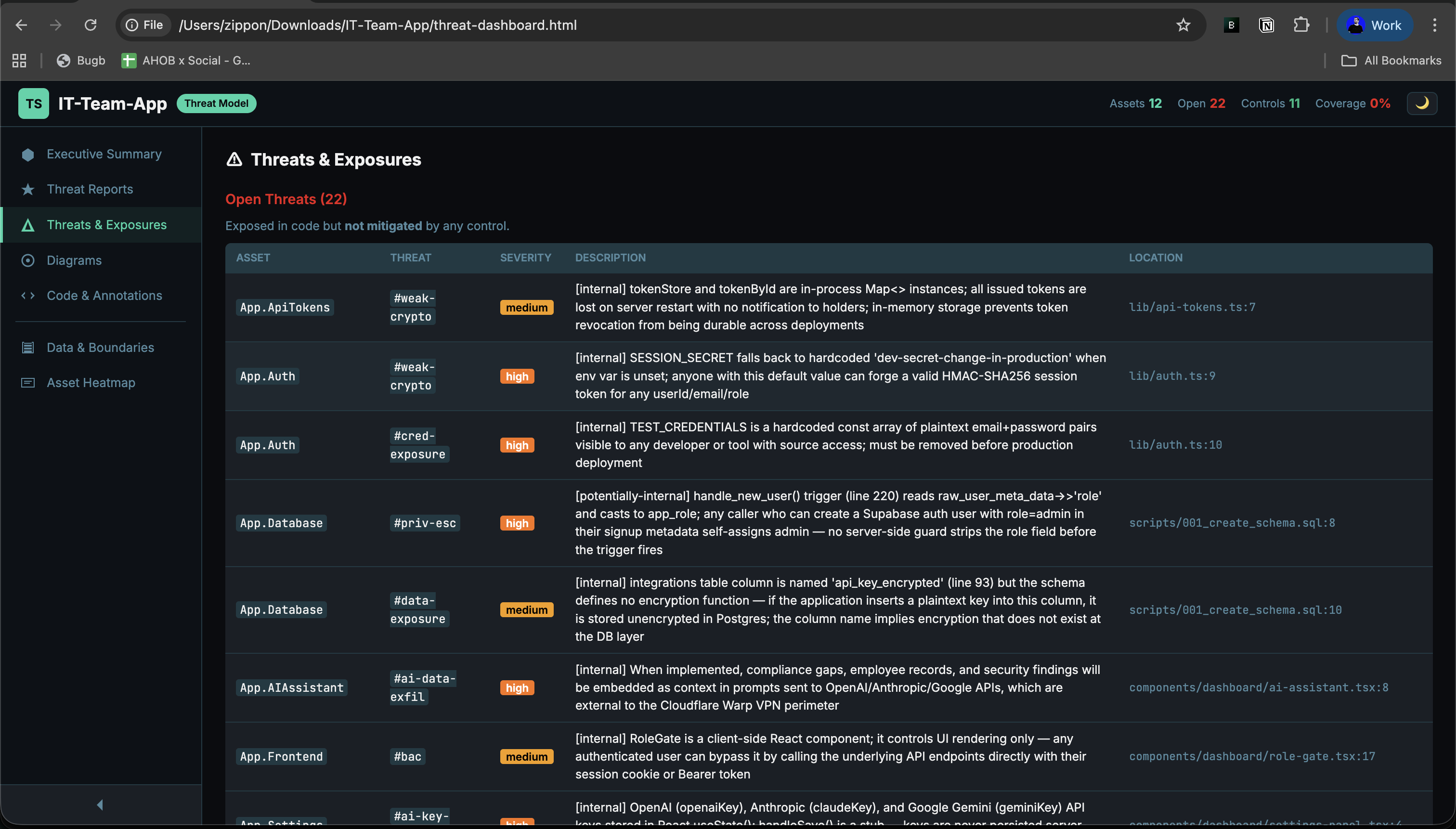
Filter open, mitigated, and accepted exposures from the generated dashboard.
Open full size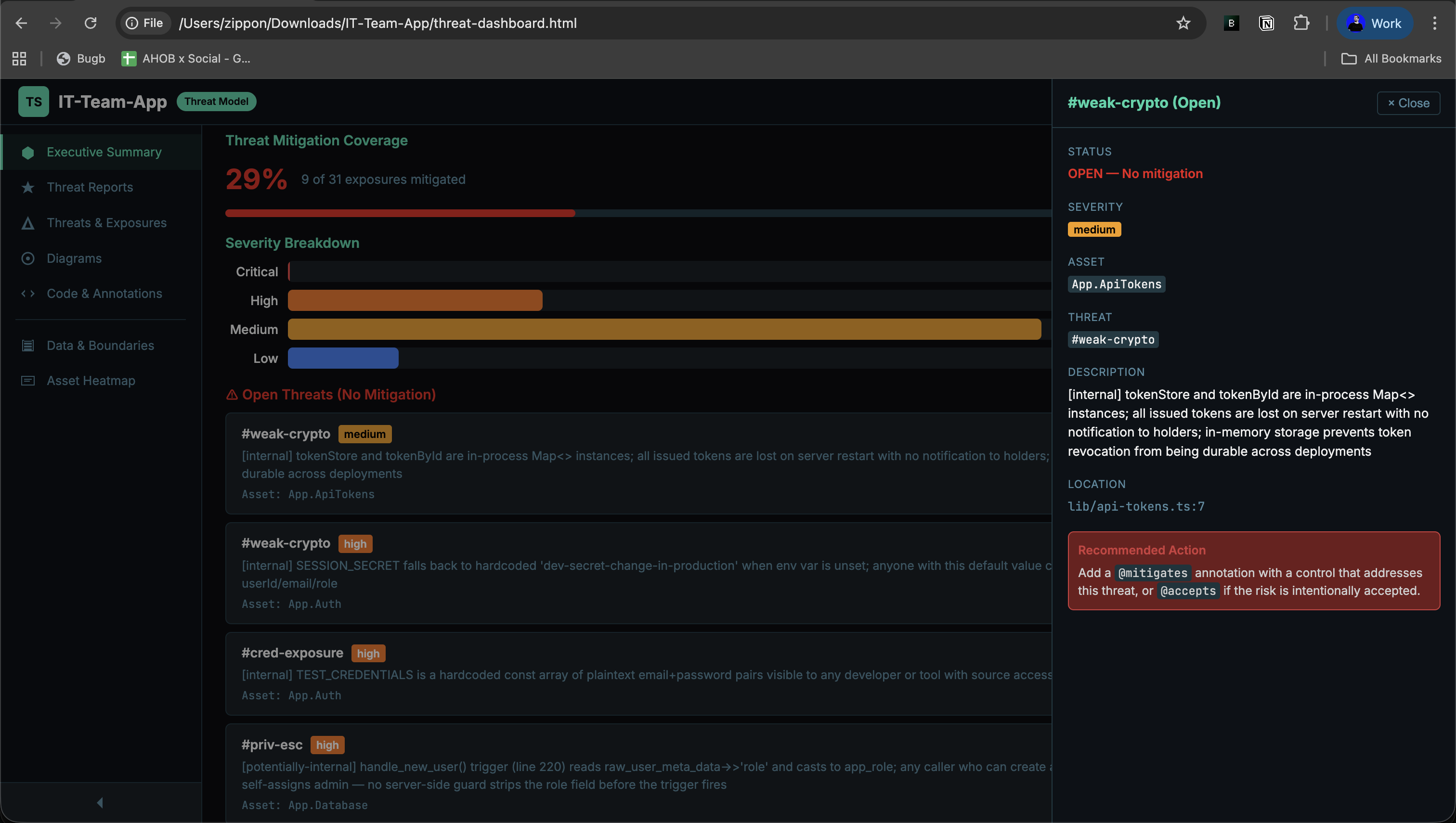
Drill into a live finding with severity, refs, and affected assets.
Open full size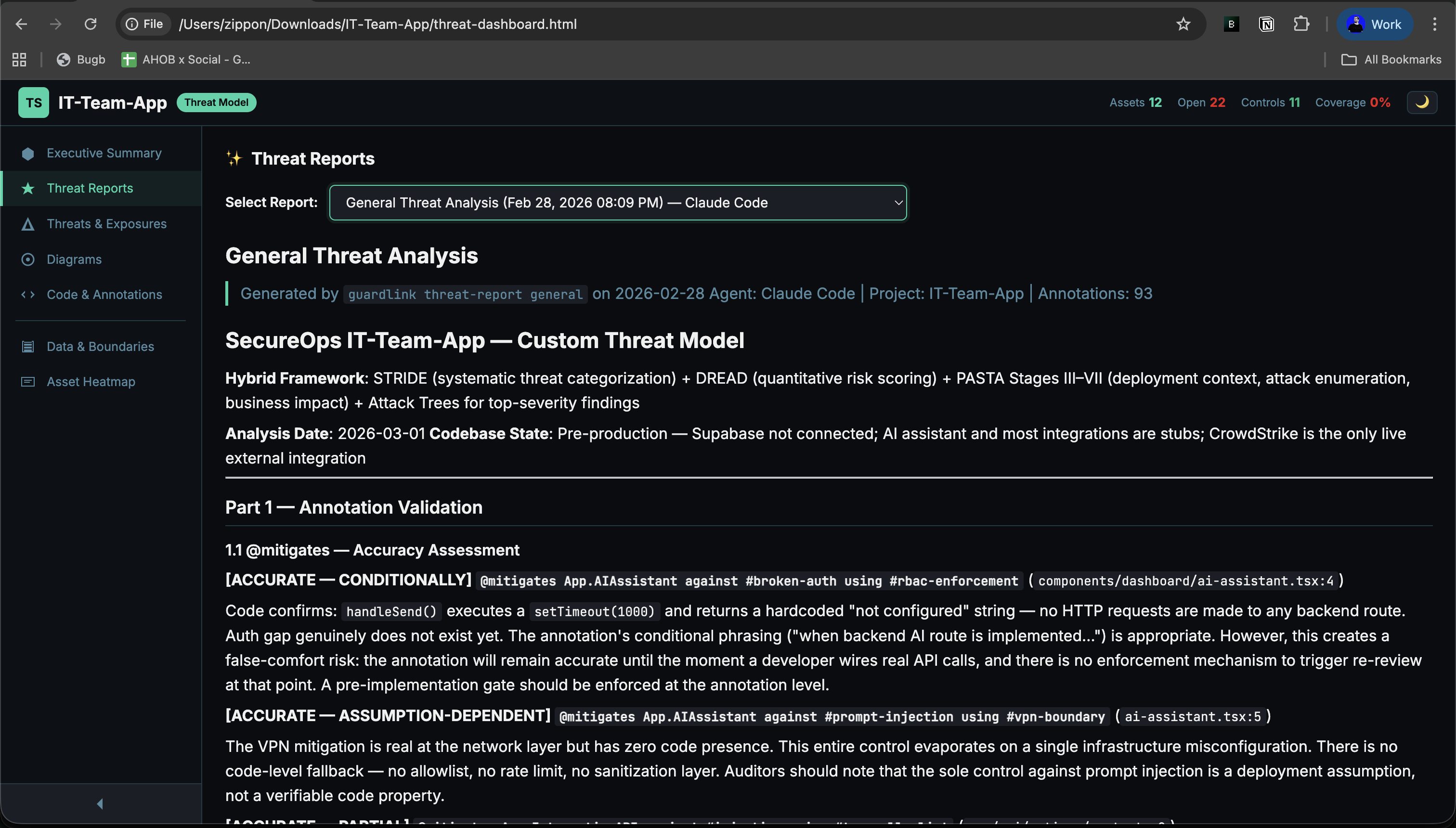
Saved AI threat reports appear directly inside the dashboard for review.
Open full size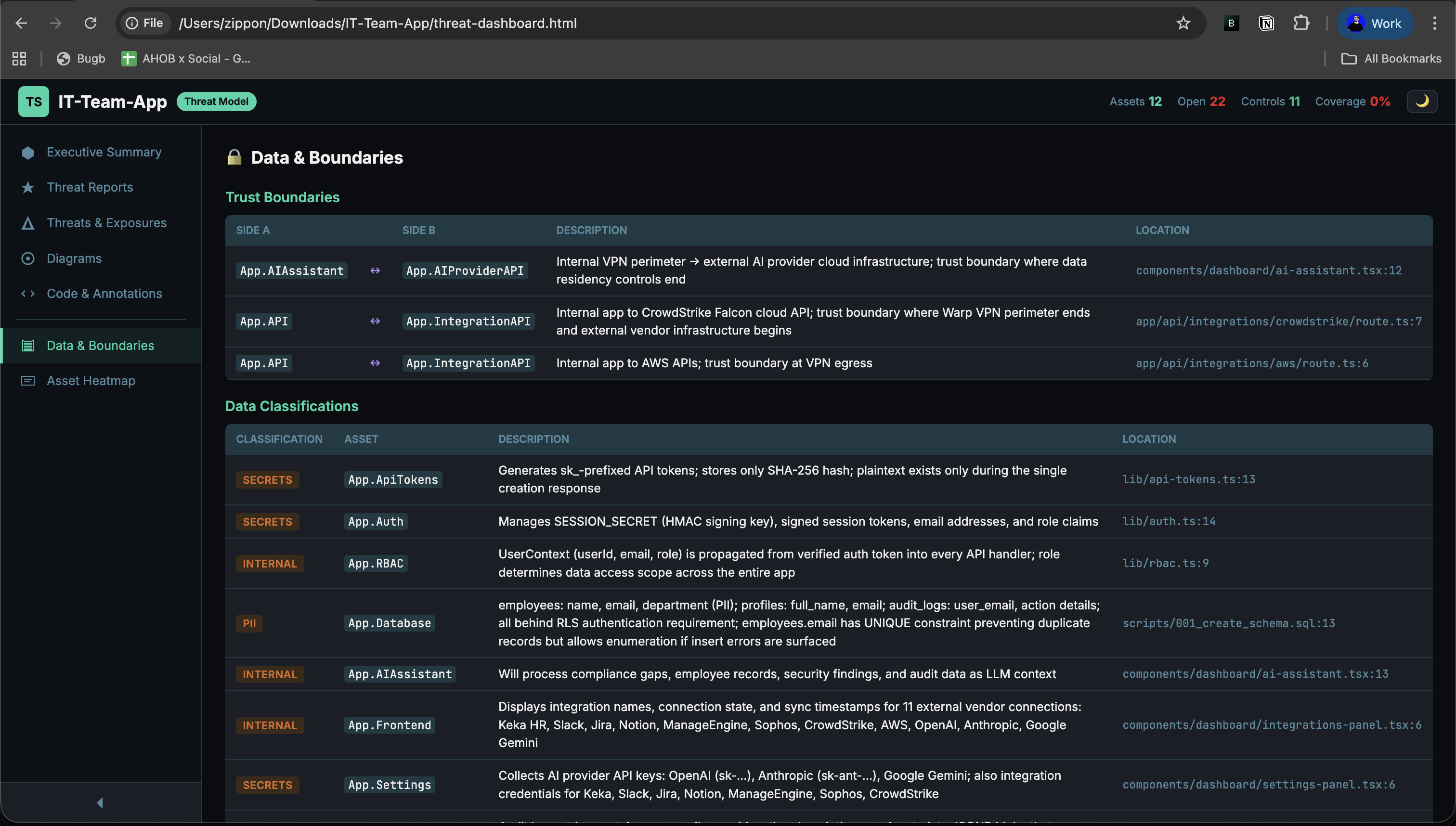
Inspect data classifications and trust boundaries across the model.
Open full size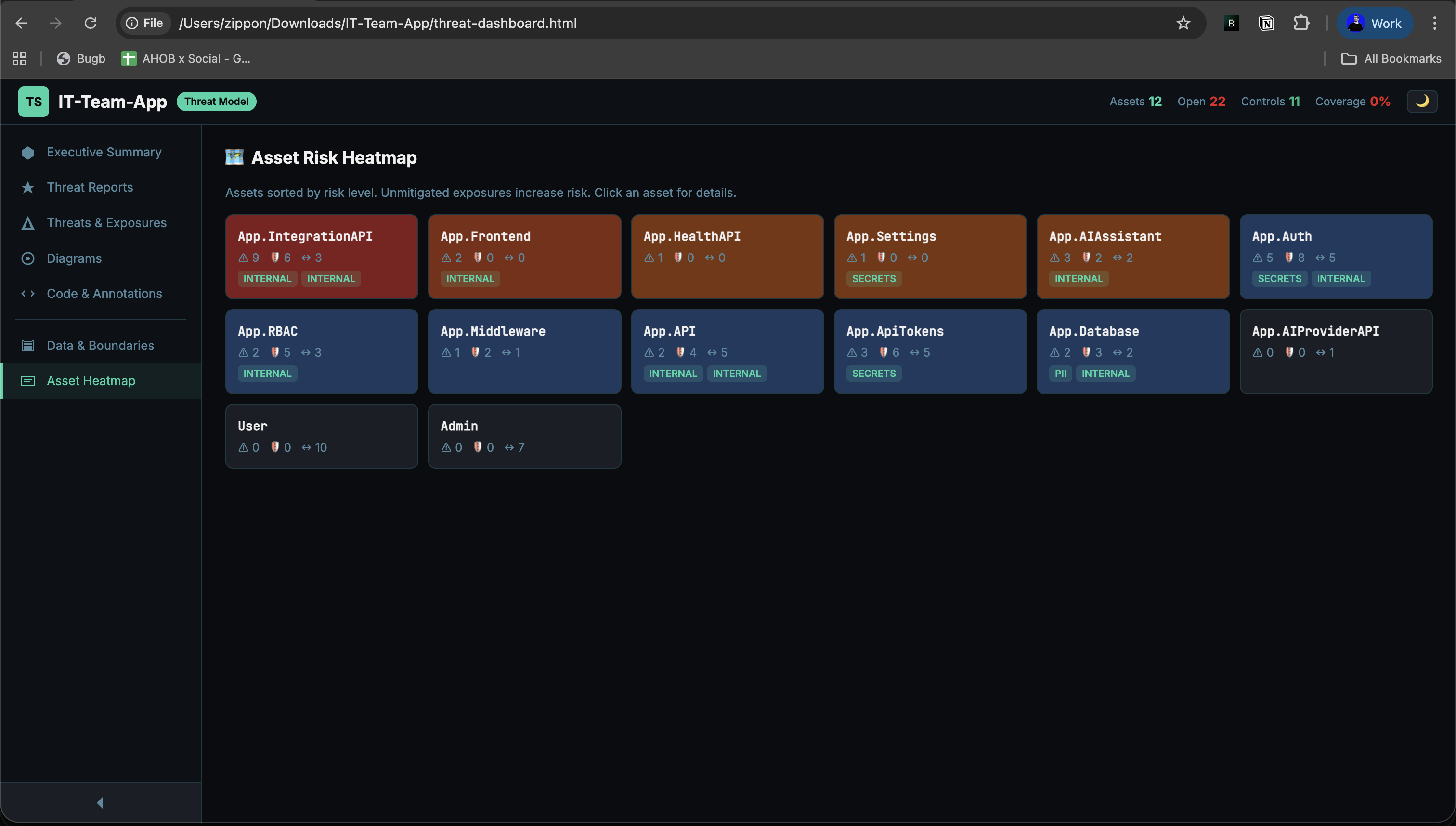
Spot the riskiest assets by exposure density, mitigations, and flow activity.
Open full size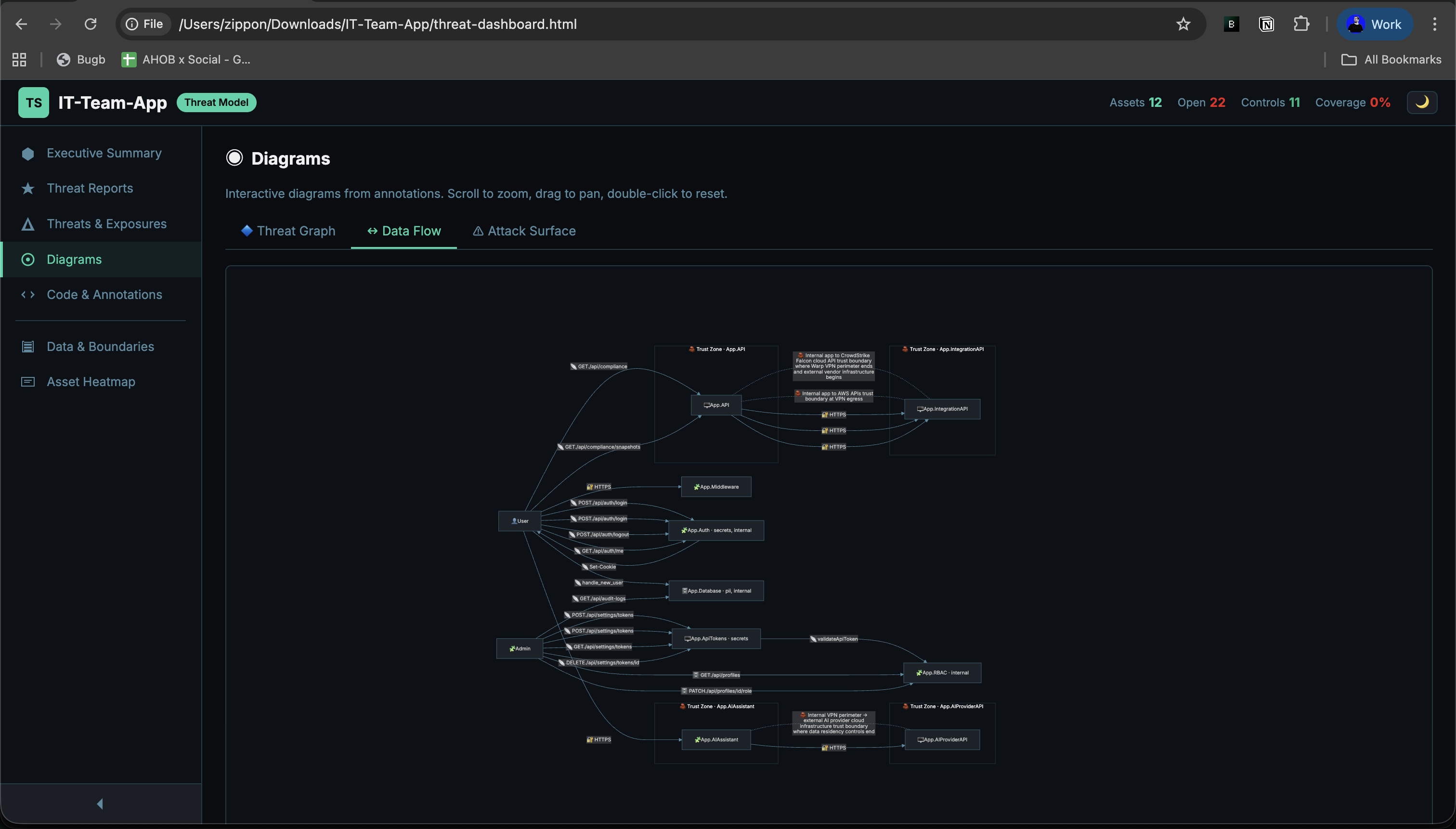
Mermaid-generated service and data movement view from `@flows` and boundaries.
Open full size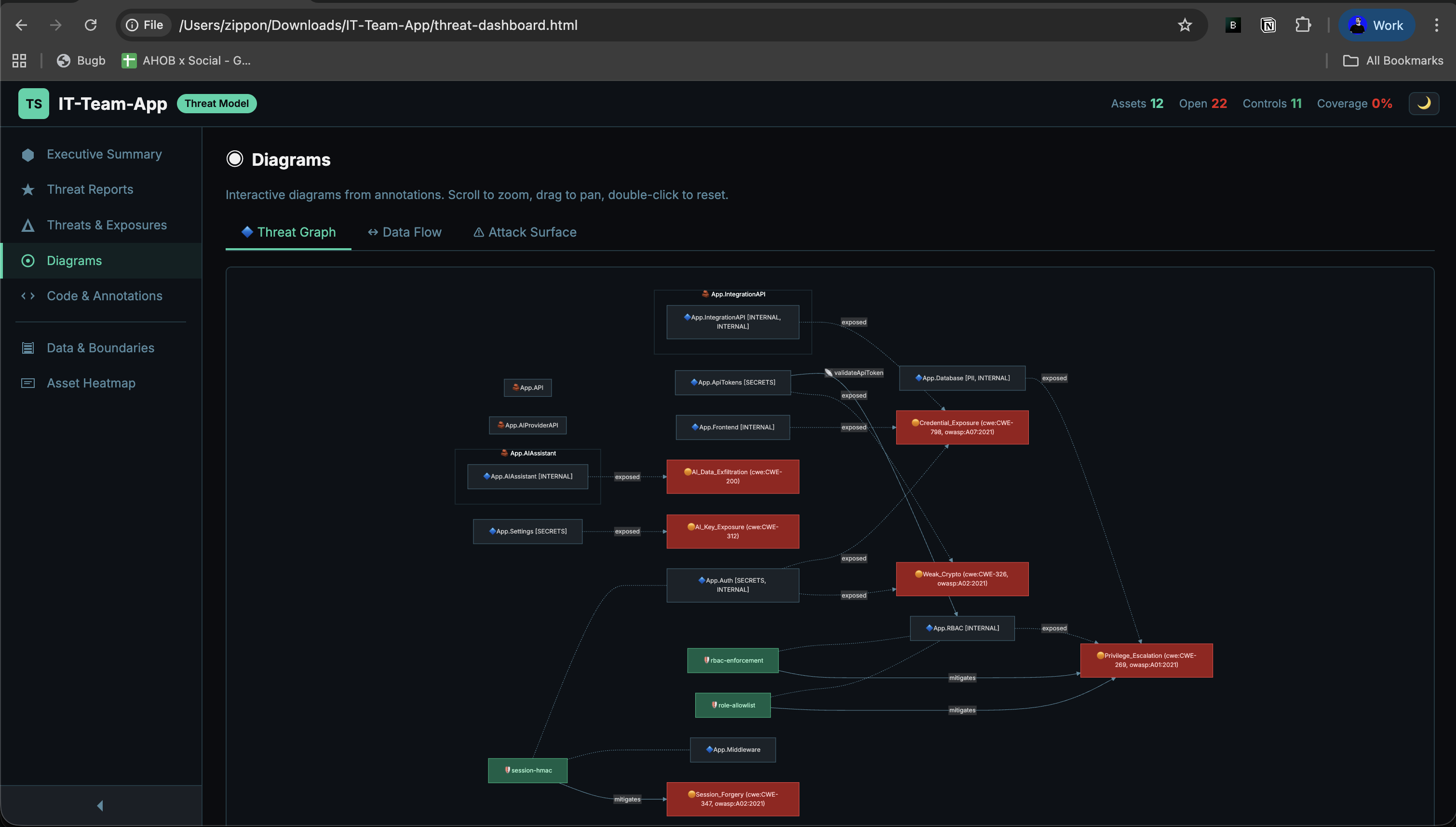
Visualize how threats, assets, and controls connect in the live model.
Open full sizeSample Dashboard HTML
GuardLink emits a single self-contained threat-dashboard.html artifact. The docs keep one embedded live demo in the diagrams section; use the standalone link below when you want the full-screen version.
Run guardlink dashboard [dir] to generate this file. The docs host the copied artifact at /guardlink-examples/threat-dashboard.html.
Diagram Types
GuardLink auto-generates 4 diagram views directly from your annotations — no manual diagramming required. Each view uses Mermaid rendering and is available in the interactive dashboard. The sections below show real dashboard output and captured screenshots.
Live Diagram Explorer
The real generated dashboard, opened directly on the detailed diagrams page. Use the tabs inside the frame to switch between threat graph, data flow, and attack surface.
This embed uses the copied GuardLink dashboard artifact from `public`, so the docs show the exact generated HTML rather than a separate docs-only renderer.
Open standalone1. Data Flow Diagram
Generated from @flows and @boundary annotations. The screenshot below is taken from the real dashboard diagrams view.
The real dashboard renders trust zones, data movement, and boundary labels directly from your parsed model.
Open full sizeNODE SHAPES
[("name")] Data stores (db, cache, file)(("name")) External actors (browser, user)["name"] Processes (api, service)2. Threat Model Graph
Generated from @exposes, @mitigates, and @control annotations. This section now uses the captured dashboard output so the graph is always detailed and stable.
Threats, assets, controls, and mitigations remain connected in one detailed graph instead of a simplified docs-only preview.
Open full sizeEDGE TYPES
3. Attack Surface Map
Generated from @exposes annotations. This view stays most useful as a live dashboard panel because the attack-surface counts, tabs, and rendering remain interactive.
Open exposures are grouped by asset with severity and mitigation state already computed by the generated dashboard.
Open standalone4. Detailed Architecture Context
GuardLink's architectural story is best read from the real dashboard surfaces rather than a docs-only Mermaid clone. Use the Data & Boundaries screenshot and jump into the live dashboard for the full summary and supporting views.
Use this alongside the live summary page to understand where sensitive data lives and which boundaries segment the model.
Open full sizeSMART NODE DETECTION
Report architecture views still use GuardLink's smart node detection rules:
[("...")] Cylinder — names containing: db, database, store, cache, file, credential, config, secret, storage(("...")) Circle — names containing: user, browser, client, external, attacker["..."] Rectangle — everything else (services, APIs, modules)Diagram Coverage Matrix
| Diagram | Annotations Used | Available In | Layout |
|---|---|---|---|
| Data Flow | @flows, @boundary, @handles | Dashboard + Report | LR |
| Threat Graph | @exposes, @mitigates, @control | Dashboard | LR |
| Attack Surface | @exposes, @mitigates, @accepts | Dashboard | LR + TB |
| Architecture | @asset, @flows, @boundary, @exposes, @handles | Report | TD |
AI & MCP Integration
GuardLink is AI-native. It exposes an MCP (Model Context Protocol) server with 14 tools that give AI coding agents full access to your threat model — parse, validate, suggest annotations, generate reports, and manage governance. When your agent writes security-relevant code, it adds annotations automatically.
MCP Tools
guardlink_parseFull threat model as JSONguardlink_statusCoverage summary and risk gradeguardlink_validateSyntax errors and dangling refsguardlink_diffCompare between git refsguardlink_suggestSuggest annotations for codeguardlink_annotateBuild annotation promptsguardlink_lookupQuery threats, controls, flowsguardlink_threat_reportAI threat analysisguardlink_reportGenerate markdown reportguardlink_dashboardGenerate HTML dashboardguardlink_sarifExport SARIF 2.1.0guardlink_review_listList reviewable exposuresguardlink_review_acceptAccept risk with justificationguardlink_workspace_infoWorkspace and sibling contextSupported Agents
| Agent | Config File | MCP | Mode |
|---|---|---|---|
| Claude Code | CLAUDE.md + .mcp.json | Full | CLI + MCP |
| Cursor | .cursorrules + .cursor/mcp.json | Full | IDE + MCP |
| Windsurf | .windsurfrules + .windsurf/mcp.json | Full | IDE + MCP |
| Cline | .clinerules + .cline/mcp.json | Full | CLI + MCP |
| Codex | AGENTS.md | No | Directive only |
| GitHub Copilot | copilot-instructions.md | No | Directive only |
Automated Maintenance
Behavioral directives injected by guardlink init instruct agents to add @exposes, @mitigates, and @flows annotations whenever they write routes, auth logic, database access, or external service calls. The guardlink sync command keeps these directives current with the latest threat model.
@shield Enforcement
Mark sensitive code blocks with @shield to exclude them from AI agent context entirely. Use single-line @shield for a function, or @shield:begin / @shield:end for larger blocks of proprietary or cryptographic logic.
MCP Configuration
This is auto-generated by guardlink init. Run guardlink mcp manually to start the MCP server on stdio.
CI/CD Pipelines
Threat modeling is only effective if enforced. GuardLink provides three CI integration points: validation gates that catch regressions, threat model diffs that block PRs with new unmitigated exposures, and SARIF export for GitHub Advanced Security integration.
GUARDLINK DIFF
Compares threat models between Git refs to catch security regressions
Export unmitigated exposures as SARIF for GitHub Advanced Security, VS Code, and SonarQube. Includes file, line, severity, and CWE/OWASP references. Filter with --min-severity.
For microservice architectures, use workspace-merge.yml to aggregate per-repo reports into a unified dashboard. Weekly diff tracking via --diff-against surfaces risk trends across services.
Example CI Workflows
Validate, diff, upload SARIF, and comment on the PR with threat model changes.
On push to main: generate report JSON artifact for merge and archival.
Weekly: download all repo artifacts, merge, diff, publish dashboard.
Open Source & Contributing
GuardLink is open source and community-driven. We believe that security standards should be transparent and accessible to everyone.